Mac Firmware Password Hash
Heres how you can bypass firmware password on Mac. An md5 hash is 16 bytes long 32 hexadecimal digits and.

Apple Efi Firmware Passwords And The Scbo Myth
EFI Firmware Password Removal Software.

Mac firmware password hash. The iRemove is a perfect unlocking tool for Mac Mini Pro MacBook Air Pro. Start up from macOS Recovery. First of all youre suggesting a MAC-then-encrypt which is known to be vulnerable to chosen ciphertext attacks ie.
If you just want to get into your Mac restart it from the System Restore DVD that should have come with it or a Mac OS X install DVD by holding down the C key at startup. Users with a Mac computer locked by firmware passcode can remove EFI password with iRemove software. It is the best EFI removal password tool available in the market today.
After digging it seems that the password is stored using a bMessage Autentication Code MAC using SHA256 b with a bvariable number of rounds b. Boot with Option key held to display the boot menus firmware password prompt. Sudo defaults read vardbdslocalnodesDefaultusersusernameplist ShadowHashDatatr -dc 0-9a-fxxd -r -pplutil -convert xml1 - -o - Where username in the above example is the user youre looking for the hash for.
86E8E435D4CE36DD can you help. Then one of the options under the Utilities menu should allow you to reset your administrator password. The following structure can describe the variable contents.
It works on all macOS devices with a T2 security chip. Hash Code Cracker for Mac is a free and open-source application written in Java designed to put the strength of a password to the test by having a go at it through its algorithms. Finally the wanted hash starts with ml and length is 203 characters.
The password is stored as a Message Autentication Code MAC using SHA256 with a variable number of rounds. You may be able to reset change or disable the firmware password using the same method you used to set the password to begin with this requires booting into Recovery Mode. Press and hold down Command R buttons together until the Recovery Mode shows up.
If you are not good at micro soldering never mind this unlock method with EFI password removed is custo. The character string provided by S at the firmware password dialog is 33 printable characters long. Firmware Password on MAC.
Find the Utilities screen and go to. Secondly youre suggesting the use of a hash rather than a MAC. Note that firmware password differs from rootuseriCloud passwords.
To reset the firmware password on newer Macs you must now follow these steps. 11-30-2013 0538 PM. Nevertheless this file doesnt appear to exist in the later versions of the operating system - specifically OS X 109 which is the first of the non-cat named OS releases.
Firmware Password on MAC. Boot with Option key held to display the boot menus firmware password prompt. Well I got a MacBook Pro early 2011 that I bought from a friend 2 months ago.
Im Wilson as you see on the forum. When I googled it I found that the firmware password should be removed or reset but I dont know how to reset it. An attacker can take a valid message modify it and observe the result to gain information about the plaintext.
A security engineer who goes by the name of fG specialized in Mac security and reverse engineering has found a way to reset a Macs firmware password without help from Apples support team. I think on previous versions of OS X password were stored in the etcshadow file. Here comes with our second MacBook unlocking video.
Submit the hash to Apple where someone will. Click Turn On Firmware Password. To get the hash.
Few links to help you. The firmware is protected by a password and I cannot boot form my HDD. When the utilities window appears click Utilities in the menu bar then choose Startup Security Utility or Firmware Password Utility.
The Firmware Password Utility is by default in the Utilities menu on the recovery partition or on the OS X install disc and may not be available if you cannot boot to these volumes. Does anyone know where the password hashes are stored on OS X Mavericks. Press Control-Option-Command-Shift-S to reveal a 33-digit hash mixed letters and numbers that contains an.
Reboot the Mac and hold down CommandR to enter recovery mode At the Utilities screen go to the Utilities menu bar item and. Reboot your Mac using the hardware buttons or if you are already inside the Macintosh being turned on hit reboot from. Enter a firmware password in the fields provided then click Set Password.
Bruteforcing the firmware password is useless for any password longer than four digits since the high number of rounds makes it impossible within a reasonable time frame. This is the part hash with the password. If hashcat has a mode for this hash thatd be a life saver.
Efi Firmware Lock Remote Erase Through Ic Apple Community
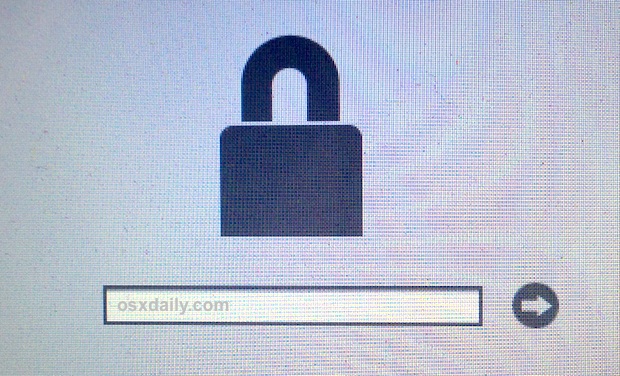
Forgot A Mac Firmware Password Don T Panic Here S What To Do Osxdaily

Gpuhash Me Online Wpa Cracker And Hash Bruteforcer Wpa Hashing Crackers
Reset Macos Firmware Password Macrumors Forums

Oh Great New Attack Makes Some Password Cracking Faster Easier Than Ever Password Cracking Me On A Map How Do You Hack

Free Download Ygdp Tool Flash Tool V5 00 Latest Update 2020 Free Download Flash Download

How To Factory Reset Samsung Note 8 Without Password Samsung Galaxy Note 8 Best Phone
Efi Firmware Password Removal Macrumors Forums
Apple Efi Firmware Passwords And The Scbo Myth
Apple Efi Firmware Passwords And The Scbo Myth

Pin On Forensic Tools

Forgot A Mac Firmware Password Don T Panic Here S What To Do Osxdaily
Mac Firmware Password Hash


Marriott Library Apple Infrastructure Firmware Password Manager For Os X
Reset Macos Firmware Password Macrumors Forums

H A S A Hacking And Security Automation Automation Computer Security Security
Efi Firmware Protection Locks Down Newer Macs Cnet


Pin On Cydia Dev
Hash For Efi Ghostlyhaks Forum

Post a Comment for "Mac Firmware Password Hash"